
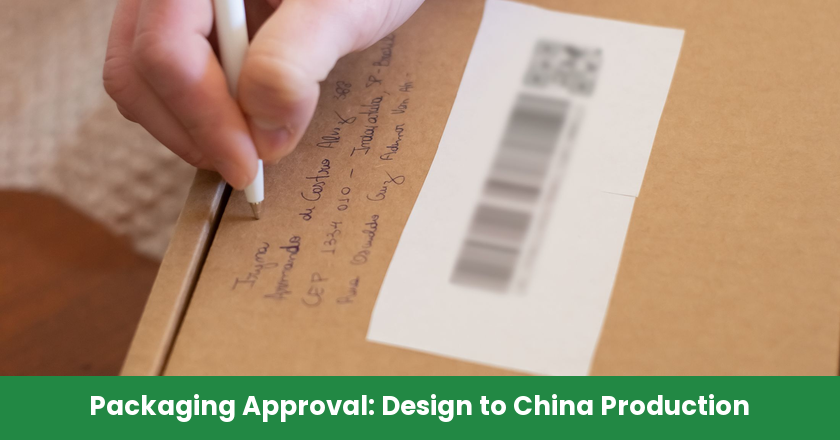
Packaging approval handoff is the transfer of identified packaging files, sample references and scoped decisions from brand design to the people authorized to prepare and release the factory production job.
For a packaging or operations manager importing a repeatable product range from China, the difficult moment is often after the design looks finished. An email saying “approved” may refer to copy, a screen image or a sample, while the factory needs permission to run a specific job. A useful handoff connects those decisions without letting one stand in for another.
Release a packaging version, not an ambiguous approval
A packaging job is ready for authorization when its actual production input matches the identified approved configuration and the required approval scopes are complete. The handoff record connects the files, evidence, decision owners and affected order, so the factory can see exactly what it may use. An unresolved difference should lead to a named action or a hold on the affected job.
- Decision: identify who approves design, technical readiness and production release.
- Standard: reference exact artwork, structural files, materials and variants.
- How it works: choose proofs for the decisions they can support.
- Risk: compare the factory input with the approved record before starting.
- Common mistake: renew the affected approval when a correction changes its basis.
Separate design approval from permission to start production
Design approval, factory confirmation and production release answer different questions and need explicit scopes. Design approval confirms the buyer’s intended appearance or content; factory confirmation establishes technical readiness for the agreed method; production release authorizes a named job using the identified inputs. The same person may hold several responsibilities, but the record should show which decision that person is making.
The brand’s creative lead may approve logo placement while a product owner approves claims and instructions. Purchasing may authorize expenditure without being qualified to approve technical copy. Before sending the handoff, name the actual owners for the decisions the package needs. If authority is delegated, record what the delegate can approve rather than assuming that everyone copied on an email can release production.
Ask the factory to acknowledge both the current input and what remains unresolved. “File received” is different from “the identified file is suitable for the agreed printing and finishing method.” A technical question about an ink or fold belongs with the responsible production contact. A request to change a product claim goes back to the buyer’s content owner.
For a home and kitchen brand extending a utensil range, packaging decisions also depend on the actual product, fit and repeat-order plan. NewBuyingAgent’s local China factory resources and product development and quality-control capability are relevant to bringing those product requirements into China sourcing. The buyer’s design owner still approves the brand’s artwork; the sourcing brief should make that authority clear.
Use an approval statement such as: “Artwork ART-B is approved for the English retail carton design shown in proof PROOF-B; this is not production authorization.” The final job release can then reference the completed design and technical decisions. This separates an accepted design from permission to manufacture without forcing the factory to interpret a vague message.
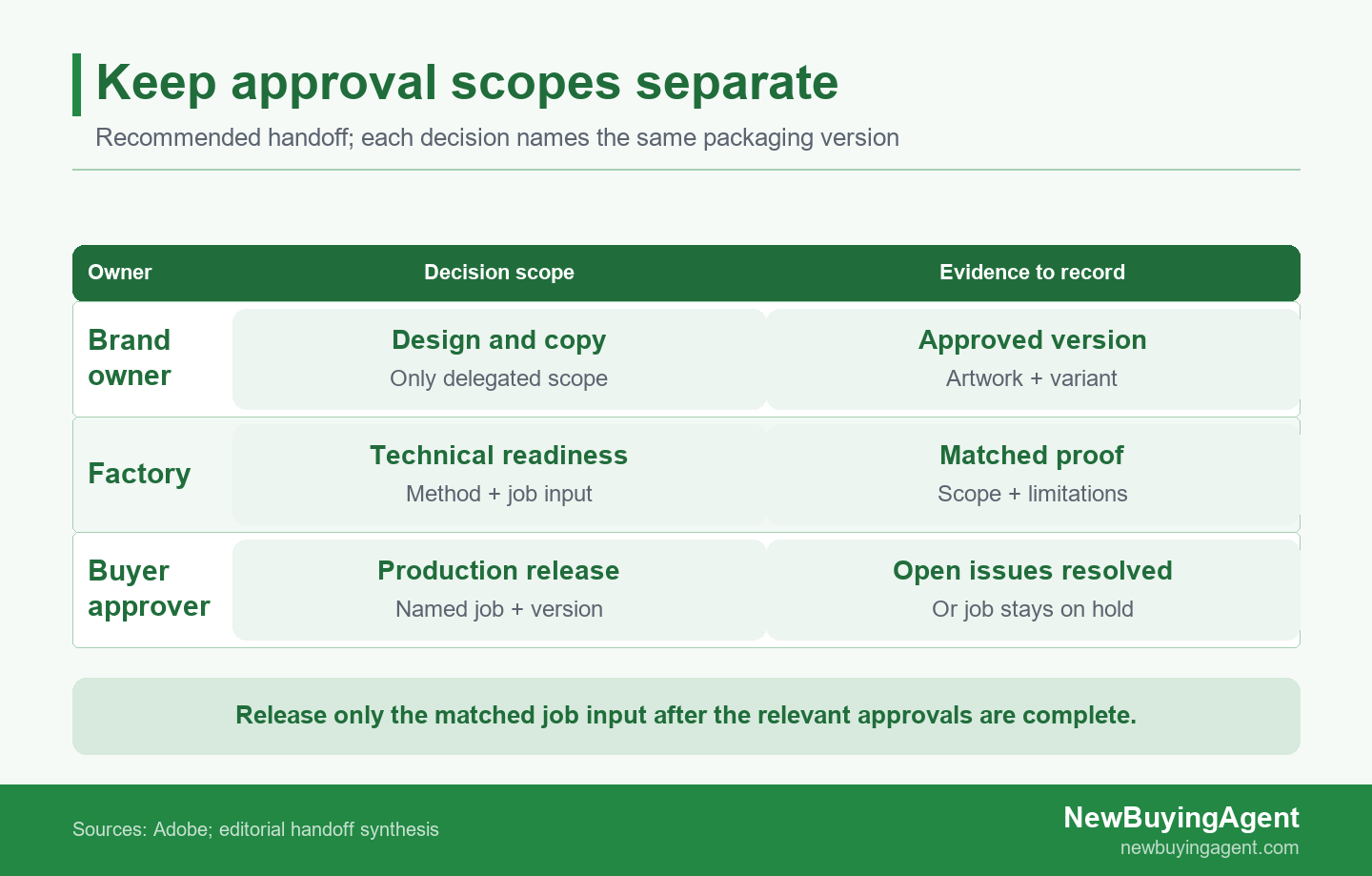
Design approval, factory confirmation and production release require explicit scopes tied to the same packaging version.
Freeze the package the factory is allowed to use
The packaging handoff should identify a controlled set of production inputs that the receiving factory can retrieve and distinguish from earlier drafts. Record the artwork revision alongside its structural layout, material specification, finishes and approved sample references. A filename alone is weak evidence when attachments have been renamed or replaced, so keep a stable reference to the exact approved file and its approval record.
A dieline is the flat cutting and folding layout of a package. Confirm its revision and how artwork is positioned against it before approving the combined result. If a structural change moves a fold through a warning or barcode, the previous artwork approval may no longer describe the package that will be produced.
ISO’s packaging processing-steps scope describes methods for storing identifiable processing-step data in a PDF, including cutting, folding and printed finishing information. The practical question for the buyer and printer is which information belongs to production artwork and which belongs to separately identified processing operations. Agree how cut lines, white ink or varnish information will be handled in that printer’s workflow; visible guide lines are not a substitute for that agreement.
Copy the following handoff record into the order file and replace the bracketed entries. References should point to actual controlled files or samples. If an entry is not relevant, record why; if it is unresolved, name the owner and keep the affected release decision open.
| Field | Entry to complete |
|---|---|
| Job scope | [Product/SKU, order reference, pack variant, language and destination] |
| Artwork | [Filename, revision, controlled location and approval reference; hash if used] |
| Structure | [Dieline revision, dimensions, material and finish references] |
| Proofs | [Proof/sample ID, version represented, intended decision and limitations] |
| Design | [Authorized person, approved-for scope, decision date and evidence] |
| Technical | [Factory contact, method, accepted input and unresolved technical issues] |
| Open issues | [Issue, affected scope, owner, closure evidence or explicit hold] |
| Release | [Authorized buyer, named job/version, decision, date and release record] |
Keep obsolete versions identifiable as superseded and remove them from the factory’s active job input. Retain their history rather than destroying the evidence of what changed. When files travel through email or messaging, the factory should acknowledge the controlled reference used for the job, not simply the latest attachment visible in a conversation.
Match each proof to the decision it supports
Packaging evidence is useful when its purpose and limitations are recorded beside the approval it supports. A digital check can answer a file question, a color proof can support an agreed appearance decision, and an assembled sample can reveal physical fit or panel placement. Combining them helps the buyer make the required decisions, but no single item automatically proves every aspect of production readiness.
Use digital checks for defined technical questions
Preflight is a technical inspection of a PDF against selected criteria. Adobe’s preflight guidance explains that a profile contains defined checks and may also contain fixups. A passing result therefore needs its profile and settings recorded: it shows what was checked, not that the design, product claims and purchase decision have all been approved.
Ask the printer to identify the expected file format and relevant checks for the agreed production method. These might concern fonts, page boxes or color handling. Avoid copying a generic export preset into every job and assuming it covers the current press, substrate and finishing requirements. Resolve warnings by their effect on the actual package rather than treating every message as equally important.
Output Preview can help inspect separations and color conditions, but Adobe notes that it cannot preview all aspects of printed output. Use it to investigate a defined file issue, then request appropriate proof for questions outside the preview’s scope. A screen image of a varnish area, for example, does not establish the finished surface feel or how the assembled pack behaves.
Save the technical report against the file actually inspected. If the report belongs to a previous revision, either confirm why it remains applicable or run the relevant checks on the changed input. The approval record should make that relationship visible to the person authorizing the job.
Confirm physical appearance and fit with suitable samples
A color proof needs an agreed reference condition. ISO’s digital proofing scope describes hard-copy digital proofs intended to simulate a printing condition defined by characterization data. Ask the print provider what the proposed proof represents and which decisions it can support. An office printout or a screenshot should not silently become the production color reference.
Physical comparison also needs agreed viewing conditions. ISO’s viewing-conditions scope addresses reflective and transmissive media, while explicitly excluding soft-proofing displays. Use a consistent, suitable viewing arrangement for the physical reference and proposed output; a photograph viewed on an unknown screen cannot settle a disputed physical color match on its own.
Assess structural fit with a sample assembled around the actual product or an agreed representative. Look at closure, product orientation, contact points and whether panels cover required information after assembly. Record differences between the sample and intended production, including material or finish substitutions. A useful approval states what those differences prevent it from proving.
For an ecommerce buyer replenishing pet accessories, a carton that fits the first sample may need review when the product shape or assortment changes. NewBuyingAgent’s product development and QC capability can help bring product-fit questions into a China product-supply brief. Include the pack references with the product specification so the quoted supply scope reflects the intended product-and-pack combination.
A fit sample is not evidence of performance through every transport route. If the order needs distribution testing or a channel-specific assessment, identify the actual requirement and suitable evidence separately. Keep that decision with its responsible owner rather than extending a visual approval into a protection guarantee.
Approve content and codes on the assembled package
Packaging content and codes should be checked in the configuration customers and receiving systems will encounter. Assign the buyer’s responsible owner to approve product identity, language variants and applicable market content, then confirm their placement on the assembled package. The factory’s ability to reproduce an image is a different question from whether the image contains the right information for that product and destination.
Keep the approved copy reference separate from informal edits in a chat. When a translation or retailer variant changes, identify the affected artwork and content owner. A production contact should not have to decide whether an unfamiliar claim is acceptable because the commercial team wrote “please proceed.”
GS1 US barcode guidance emphasizes suitable placement, surface and clear quiet zones around the symbol. On an assembled carton, check whether a fold, seam, edge or applied label interferes with the planned location. This is why the approved flat artwork should be compared with the completed pack rather than reviewed only as a full-screen image.
For measured printed-symbol quality, GS1’s verification guidance explains that a compliant barcode verifier measures parameters and provides a grade, with minimum quality determined by the application requirements. A successful scan with an ordinary device is a useful functional observation, but it does not replace a requested verification report. Specify the applicable requirement and ask for evidence tied to the relevant printed sample.
Also check that the encoded product data belongs to the intended variant. A readable symbol carrying the wrong item identity still creates the wrong handoff. Preserve the approved data reference with the artwork so a later layout correction does not accidentally replace the code with one copied from another pack.
Authorize the job and control the next change
Production authorization should reference the named job, current packaging input and completed approval record. Before issuing it, resolve differences between what the buyer approved and what the factory intends to run, including technical corrections made after proof approval. When a change affects an earlier decision, return that affected scope to its authorized owner and retain the resulting approval with the updated file.
Adobe’s fixup documentation states that a fixup permanently changes the document. Even a correction made for technical readiness can alter the basis of an approval. Ask what changed, retain the revised file and assess which proof or decision needs renewal. Calling a change “prepress only” does not establish that appearance, content or barcode placement is unaffected.
Consider an illustrative China-sourced kitchen utensil carton. The buyer’s record names ART-B and its matching proof, but the factory’s job reference still points to ART-A. The designs look similar, yet ART-B contains the current barcode location. The buyer holds the affected packaging job, asks the factory to replace the active input and requests evidence showing ART-B is the file actually prepared for production.
The factory then proposes moving that barcode again to clear a fold. That is a changed input, not confirmation of the existing approval. The responsible owner reviews the new placement and relevant assembled-pack evidence; the record receives the revised artwork and approval reference. The authorized buyer releases the job only after the factory acknowledges that matched input. Missing or contradictory evidence keeps the affected job on hold.
Use this final checklist as the release message’s supporting record. A checked box should point to evidence already in the handoff file:
- The job, SKU and packaging variant match the order being authorized.
- The factory’s actual input matches the controlled artwork and structural references.
- Design, content and technical decisions have named authorized owners and explicit scopes.
- Proof limitations and production differences have been accepted by the relevant decision owner.
- Open issues are closed, or the affected production scope remains on hold.
- The authorized buyer’s release identifies the job/version and the route for later changes.
For a product range moving into China sourcing, send NewBuyingAgent the product sourcing requirements with specifications, quantities, destination and delivery timing. Add the controlled packaging references, approval owners and repeat-order plans so the product-supply scope and quotation can account for the intended packaging handoff.
FAQ
Can a repeat order reuse the previous packaging approval?
A repeat order can reuse an approval only when the authorized buyer confirms that the approved packaging configuration and relevant order conditions remain unchanged. Compare the new order’s variant, product fit, materials and destination with the retained record. If anything changes, identify the affected approval rather than restarting unrelated decisions automatically. Record the reuse decision against the new job so the factory has current authorization.
Who can approve packaging when the usual approver is unavailable?
An unavailable approver can be replaced by a formally delegated person whose documented authority covers the specific packaging decision and its affected scope. Record the delegation and reference it in the decision. If two people give conflicting instructions, escalate to the named authority instead of letting the factory choose the easier version. Keep the affected job on hold until an authoritative instruction resolves the conflict.
Does later sample approval authorize packaging already in production?
Approving a later sample does not by itself resolve the disposition of packaging already produced under an earlier or unauthorized production input. Identify which stock used which input and keep the retrospective stock decision separate from authorization for further production. The responsible buyer can then assess acceptance, correction or another agreed disposition using relevant evidence. A later signature should not obscure what was actually manufactured.
Can one approval cover several destination markets or languages?
One approval can cover several variants when its record explicitly identifies each market, language and packaging version and the relevant owners have approved them. A shared master design does not establish that every translated panel or destination-specific detail was reviewed. List the included variants and distinguish any exclusions. The factory can then prepare each authorized version without interpreting silence as permission to extend the approval.
NewBuyingAgent
Related Resources


Get Started Today
Let's Turn Your Sourcing Goals into RealityWeChat:+86 15157124615
WhatsApp:+86 15157124615
Address:Building 10 #39 Xiangyuan Road, Hangzhou, China