
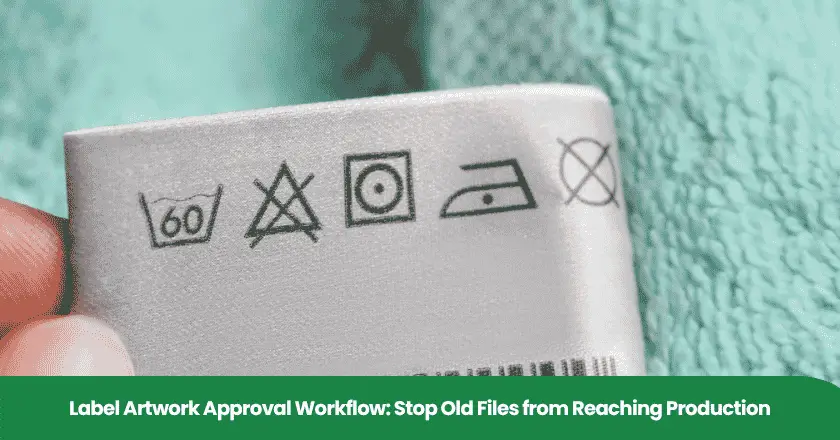
A label can look correct in an approval email while the factory prints an earlier version. For a packaging or operations manager responsible for a China product launch or replenishment order, the practical task is to connect the approved artwork to the actual production input. Establish who can approve content, who can confirm print readiness and who can authorize the job. Then retain evidence that the factory used the released file for the intended product and packaging component.
Approve a specific file for a specific production use
A usable label approval identifies the exact file, its approved scope and the production use being authorized. A filename containing “final” cannot establish those facts when copies remain in email, shared folders or printer queues. Compare the actual job input with the release record before printing, and hold a mismatch until the responsible people resolve it.
- Definition: A release record connects a controlled artwork revision with the reviews and authority needed for a particular use.
- Risk: An approved proof and a production file can diverge during copying, editing or conversion.
- Common mistake: Treating approval of wording as approval of material, print settings and the production run.
- Decision: Use one controlled release route, withdraw superseded production copies and reconcile the first labels with the approved version.
Define the controlled artwork and its approval scope
The artwork record should identify the product variant, market, packaging component and intended use alongside the file. A useful principle in published ISO/IAF process-auditing guidance is that the organization determines the process documentation it needs; the referenced standard does not prescribe its format, media or content. Choose a practical record that makes the approval unambiguous, rather than assuming a particular form is universally required.
Assign a document identifier and revision, then record the exact reviewed file. Keep the print PDF distinct from the editable source and from images used for discussion. Where filenames can be reused, add a document-system version or a file checksum: a calculated fingerprint of the file's contents. A checksum helps distinguish files; the team still needs to decide whether the identified content is correct.
When editable files are required, InDesign's packaging function can collect the layout, linked graphics, fonts and an output report. This illustrates why an editable layout may depend on other assets. Agree which files the printer needs and how they will be controlled, with appropriate asset permissions, instead of forwarding an incomplete source file or an unexplained collection of attachments.
Name the owner of the approved product information and the person authorized to release artwork for use. They may be different people. A commercial buyer can coordinate the decision without claiming authority to approve every technical or destination-specific statement. Record unresolved requirements and route them to the competent reviewer before release.
For recurring product procurement, NewBuyingAgent's local China factory network and product-development and quality-control capability are relevant resources for executing agreed packaging requirements. Review NewBuyingAgent’s company background when assessing that procurement support. Keep the buyer's artwork approval authority explicit in the product brief so the factory receives a clear requirement.
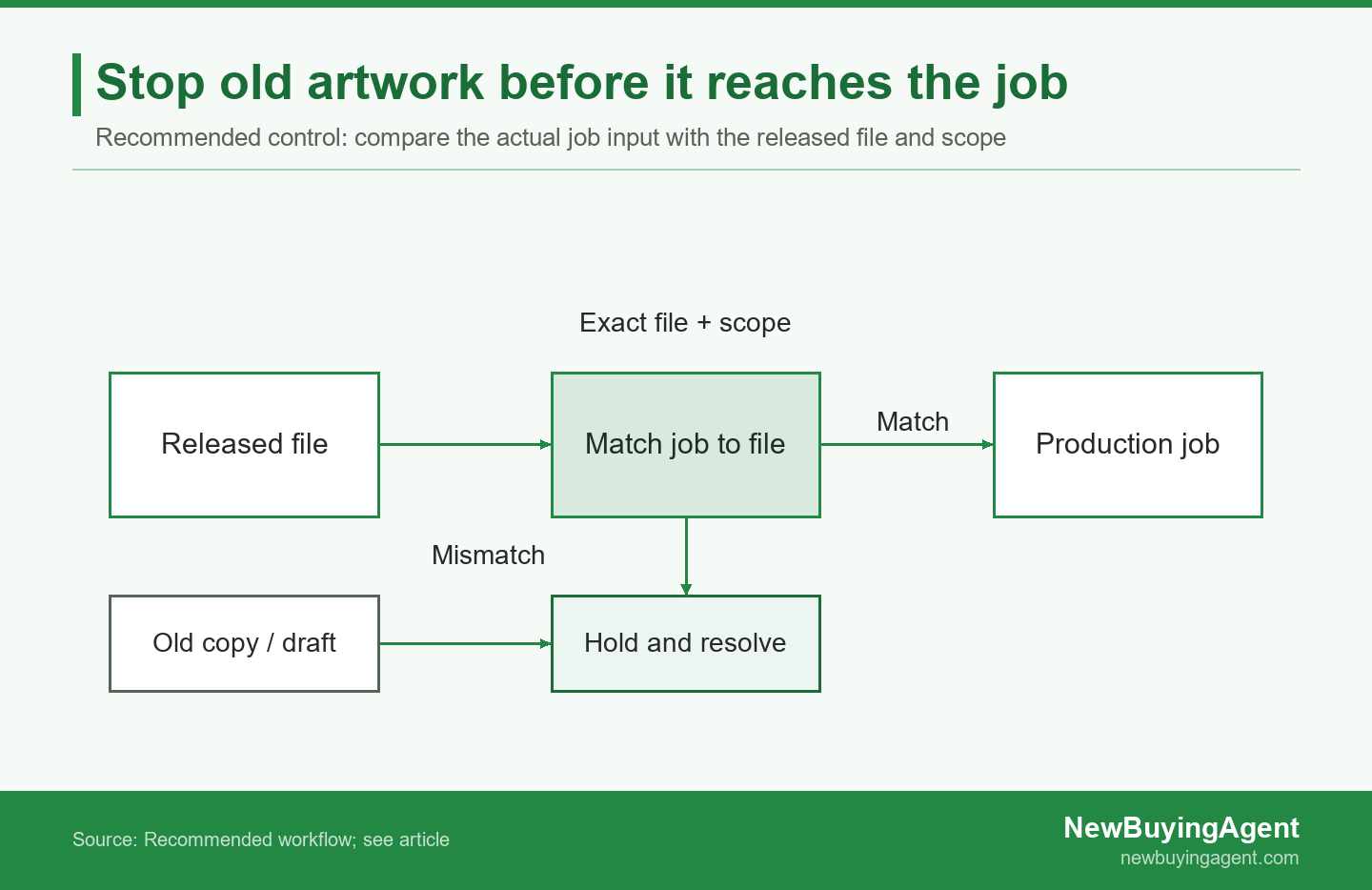
The production job proceeds only when its file and scope match the release record.
Separate content approval from print readiness
Content approval establishes whether the label says and shows the right things for its intended product and market. Print review establishes whether the supplied file is suitable for the agreed printing process and packaging material. Keep the owners and evidence distinct, then make production authorization depend on the relevant reviews being complete for the same version.
Compare the actual content and assess the change
Use a comparison against the previous approved file to locate changes, then check those changes against the authorized product information. Acrobat's comparison documentation distinguishes text-only comparison from checks that include graphics. A text-only result can miss a changed product illustration or symbol, so choose the comparison scope deliberately and review the output rather than accepting an empty change list at face value.
Some artwork changes affect product identity. The GS1 GTIN Management Standard's primary-brand rule requires a new GTIN when the primary brand appearing on a trade item changes. Assess the actual change against the applicable rule instead of assuming it is merely cosmetic. Other content decisions, including destination-specific requirements, need their own relevant review.
Record each requested correction with its location, approved replacement and reviewer. After correction, compare the new file again: confirm the requested change and check for unintended changes elsewhere. Close comments against the revised file, not a statement that the designer “has done everything.” This gives the next reviewer a specific version and a finite set of decisions to examine.
Review the print file against the intended process
Preflight means technical checks of a print file against selected criteria. Adobe's guidance on preflight profiles makes the inspection's effectiveness depend on how those criteria are defined. Agree the relevant profile or checks with the printer, including the actual process and material, so a generic “passed preflight” message does not stand in for a clearly scoped result.
A screen preview also has limits. Acrobat's Output Preview guidance describes simulated output and notes print characteristics that need proofing with the print service provider. Use a screen review for what it can establish, and agree a suitable physical proof or production sample where the decision depends on the printed result. Do not infer a color or material approval from a messaging-app screenshot.
Give the technical reviewer the final-size file and agreed specifications. Identify label dimensions, the intended material, print position and any barcode requirements. Where a correction or conversion changes the file, identify the resulting version and assess which approvals it affects. A printer's adjustment should return through the appropriate review route before the adjusted file becomes the production reference.
Give the factory a release package it can identify
A release package should identify the approved production file, its review evidence and the person authorizing its use. Give the factory a controlled retrieval point and require acknowledgment of the exact revision and job scope. The objective is to make the production input traceable to the approval, including when files move between the buyer, factory and an external printer.
Retain technical evidence with enough detail to identify the check performed. For example, Acrobat's preflight audit-trail documentation describes checking a profile fingerprint to confirm that the requested profile was used on a PDF. This is evidence about that check; it does not approve the wording, extend the result to another file or authorize a production job.
Ask the factory or printer to acknowledge the document identifier, revision, packaging component and intended order or run. Have them return the actual file reference used in the job, rather than simply reply “received.” If they need a converted production format, agree how its output will be compared with the approved reference and who will authorize it. Keep the approved reference available for that comparison.
Separate the released production area from drafts and archived revisions. Preserve history for investigation while removing superseded files from ordinary production selection. Check local downloads, templates and queued jobs when a revision replaces an earlier release. Changing a shared-folder filename will not, by itself, tell the team what happened to a copy already prepared for printing.
A retail brand replenishing pet accessories may need the same product specification and packaging revision applied consistently across repeat orders. NewBuyingAgent's factory-resource access and product-development and QC capability are relevant to that product-supply task. Discuss product supply and label requirements with NewBuyingAgent, including the component and release responsibilities, so the packaging requirement is considered within the agreed procurement scope.
Put changed artwork back into a pending state
A revised file needs an explicit review decision rather than inherited approval from its predecessor. In the documented WebCenter workflow, uploading a new version during an ongoing approval cycle stops that cycle; restart details depend on settings. This is a software-specific example of a useful control principle: make the changed version's status visible and decide which reviews need repeating before release.
An illustrative old-file mismatch before a label run
Consider an illustrative replenishment order for a pet-accessory brand containing 1800 labels. Of these, 600 apply to a variant with a revised pack-contents illustration. The buyer approved revision D of its proof, but the printer has not confirmed which file is queued. These quantities and revisions are hypothetical, not a client production record.
The supplier returns a proof showing the earlier accessory illustration, and the printer's job reference names revision C. The approval record names revision D. The issue is now specific: the approved proof and actual production input do not agree. An approval email cannot resolve that mismatch without identifying and checking the file the printer will use.
The buyer holds the affected variant's label run. The responsible team retrieves the controlled release, withdraws the old queued copy and generates a new proof from the intended input. It compares that proof with the approved reference and records who authorizes the corrected job. Unaffected variants remain subject to their own valid releases rather than an automatic blanket approval.
Before proceeding, the team reconciles the approved revision, actual file identity, job record and first production label. This illustrative example shows how a known mismatch changes the decision; it does not prescribe a universal sample size or demonstrate an actual defect reduction. Any already printed stock needs a separate disposition decision.
Close the change against both files and existing stock
Close the change only when the new approval and the production references agree, with old copies and materials accounted for. Record the affected variants, jobs and stock, the replacement version and the person checking implementation. A revised attachment is only part of the correction when printing plates, saved settings, queued files or preprinted labels may still refer to the old version.
Carry the released revision into the next order's packaging specification. If old and new labels can legitimately coexist, document their permitted uses and how the factory distinguishes them. Keep the decision accessible to the person preparing the next run, rather than relying on the memory of whoever handled the previous email exchange.
Check the file-to-label handoff at production start
Production-start verification should connect the actual label with the released file and intended job. For GS1 logistics labels specifically, the GS1 Logistic Label Guideline distinguishes visual checks, relevant label information and barcode-symbol technical verification. Preserve those separate purposes when relevant; an attractive label is not evidence that its data or barcode parameters are correct for the intended use.
- Match the actual input file and revision to the current release record and named job.
- Confirm the product variant, market and packaging component before the run begins.
- Compare the first printed labels with the approved reference, including changed content and layout.
- Check the agreed physical and barcode requirements using the appropriate evidence.
- Confirm superseded labels or queued files cannot be selected for this job.
- Record the result, open discrepancies and the person authorizing continuation.
Agree who performs these checks and what evidence the buyer receives. Include enough context in photographs or records to connect the sample to the job, while retaining the controlled file for comparison. Repeat the affected checks after a relevant setup or artwork change. This is a practical purchasing control; product-specific rules and the agreed production-quality plan determine any additional requirements.
Use a release record and checklist for repeat orders
A useful release record lets the buyer and factory reconstruct exactly what was authorized and used. Complete the fields below for the actual product, component and run, with a named owner for each unresolved decision. The table is a practical template rather than a prescribed certification form; adapt it to the agreed responsibilities and retain the supporting files.
| Record field | Enter for this job | Evidence to retain |
|---|---|---|
| Object and file | Product, variant, market, component, file identifier and revision | Controlled file and exact version reference |
| Review decisions | Content and print reviewers, scope, date and open issues | Closed comments, comparison and relevant proof/check results |
| Authorization | Released use, named approver and factory/printer acknowledgment | Release decision tied to the intended file and run |
| Implementation | Actual job input, first-label result and old-material disposition | Job reference, sample evidence and recorded closeout |
Review the record across a whole row: a decision should point to its evidence, not just a person's name. Where a field is not applicable, explain why. On replenishment, confirm that the same released configuration still applies and identify changes before the factory prepares the run. This keeps the record useful without collecting signatures that do not correspond to a real decision.
For an importer expanding a product line, connecting label requirements with the supplied product is part of making repeat procurement workable. NewBuyingAgent's China-side factory resources and QC capability are relevant to that coordination. Send NewBuyingAgent your product and packaging brief, including specifications, quantity, destination, timing, current sourcing situation, artwork revision and repeat-order needs, to discuss an appropriate product-supply scope.
Frequently asked questions about label artwork approval
Can we run this artwork workflow using email and shared folders?
Yes, email and shared folders can support the workflow if the team controls file identity, approval scope, release authority and obsolete copies. Use a clear release record, restricted production selection and explicit acknowledgment of the version being used. The tool choice matters less than whether the team can demonstrate the link between approval and the actual job input.
Does a minor artwork correction need the entire review repeated?
Repeat the reviews affected by the correction and confirm its wider impact; the prior approval should not silently cover changed content. Identify the changed version and explain why a review remains valid or needs repeating. A small text edit may affect layout or a label requirement, so assess its effect rather than classifying it solely by the designer's description.
Can a screenshot or signed proof replace the production file?
A screenshot or signed proof can record a review decision, but it needs a clear link to the exact production file being authorized. Retain the file identifier and revision with that decision, and check any printer conversion or adjustment against the approved reference. A signature on an unidentified image leaves the production team uncertain about which input it may use.
What should we do with labels printed from an old revision?
Identify and segregate the affected labels or packed stock, then obtain a documented disposition decision before using or reworking that material. Record which products and quantities are affected and who can authorize the outcome. Do not assume a new PDF resolves existing inventory; check whether rework is appropriate and how the factory will verify the corrected result.
NewBuyingAgent
Related Resources
Начните сегодня
Давайте превратим ваши цели по закупкам в реальностьWeChat:+86 15157124615
WhatsApp:+86 15157124615
Адрес: Здание 10 #39 Xiangyuan Road, Ханчжоу, Китай